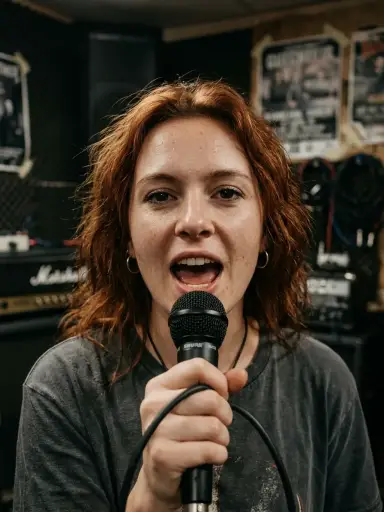
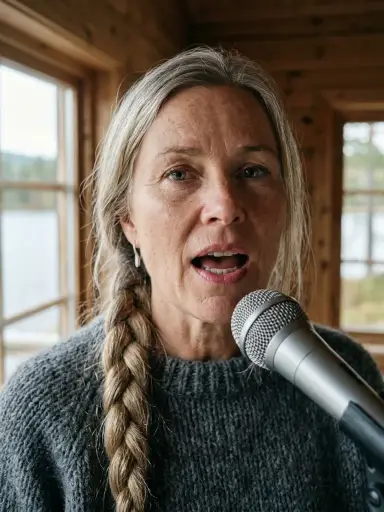
Reggaetón · chamber cello · cathedralmade in Chorus777 — press play
New One web app · Suno V6 inside · your keys, your songs

Talk. Paste. Record. Three minutes later: a song.

A finished song with a cover, karaoke lyrics and a video — in any style, any language, with an orchestra if you want, even in your own voice. Then do it 25 times in a row and hand out a whole album.

Press play — hear a song made in this app
Reggaetón with a chamber cello, in a cathedral — one click in Chorus777

“Most Suno users type one line and take what comes. You get a studio.”

The idea in one breath
0
music styles
0
input → finished song
0
songs planned per album
0
takes per song, A / B
0
monthly subscription needed
0
components
The real input

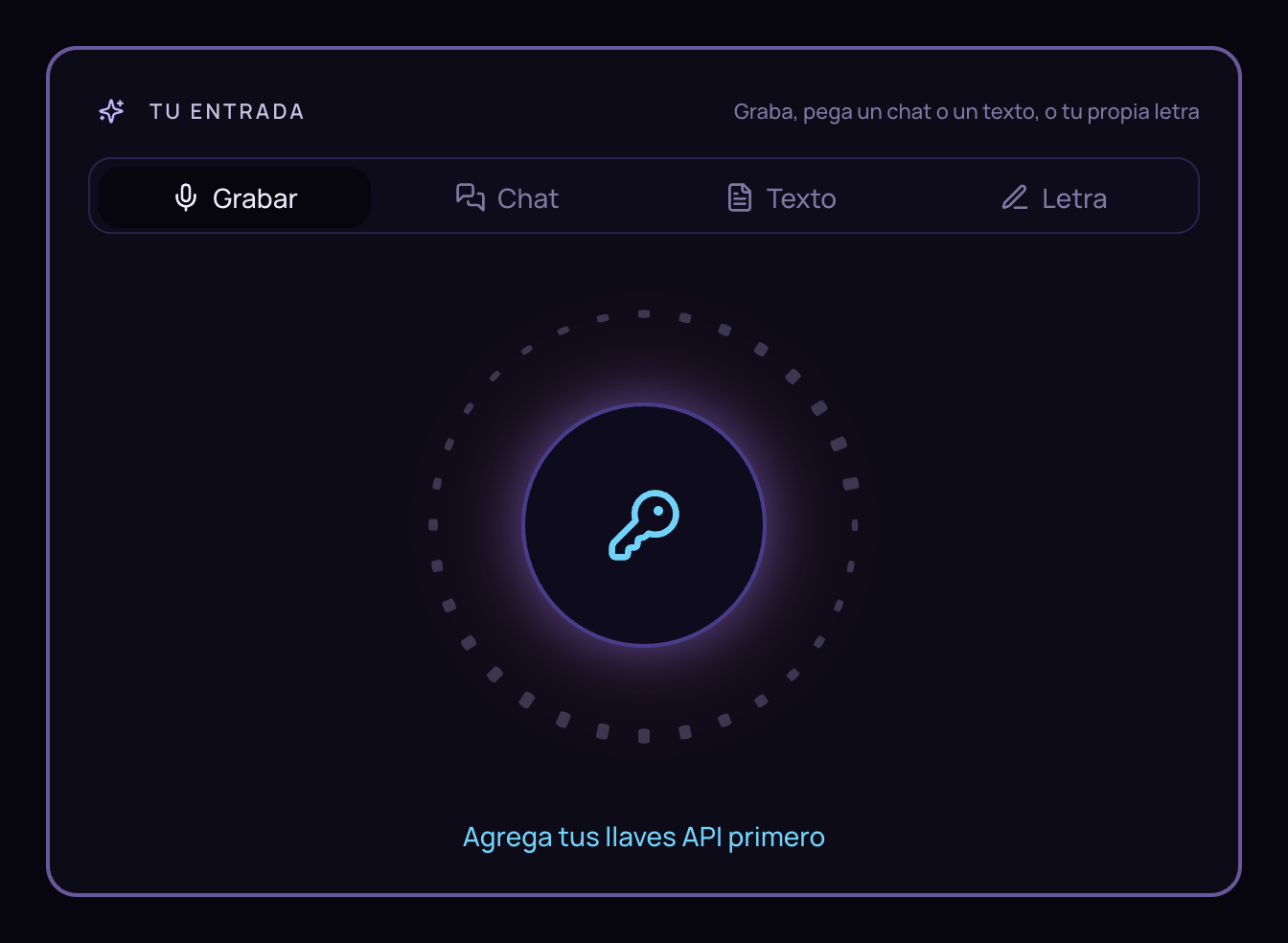
Talk, paste, or record. That’s the whole input.

Four ways to start — the same screen you use in the app.

How it feels

From a voice memo to a finished record

Four inputs. One pipeline. Every song arrives complete.

Record

Speak the story. Whisper transcribes it. The app writes and sings.

Paste a chat

A WhatsApp thread goes in — it knows who is speaking — a comedy track comes out.

Paste any text

Sermon notes, a newsletter, a product page. It becomes the subject of the song.

Your own lyrics

Sung exactly as written. [Verse] [Chorus] tags respected.

Covers · faces · backgrounds

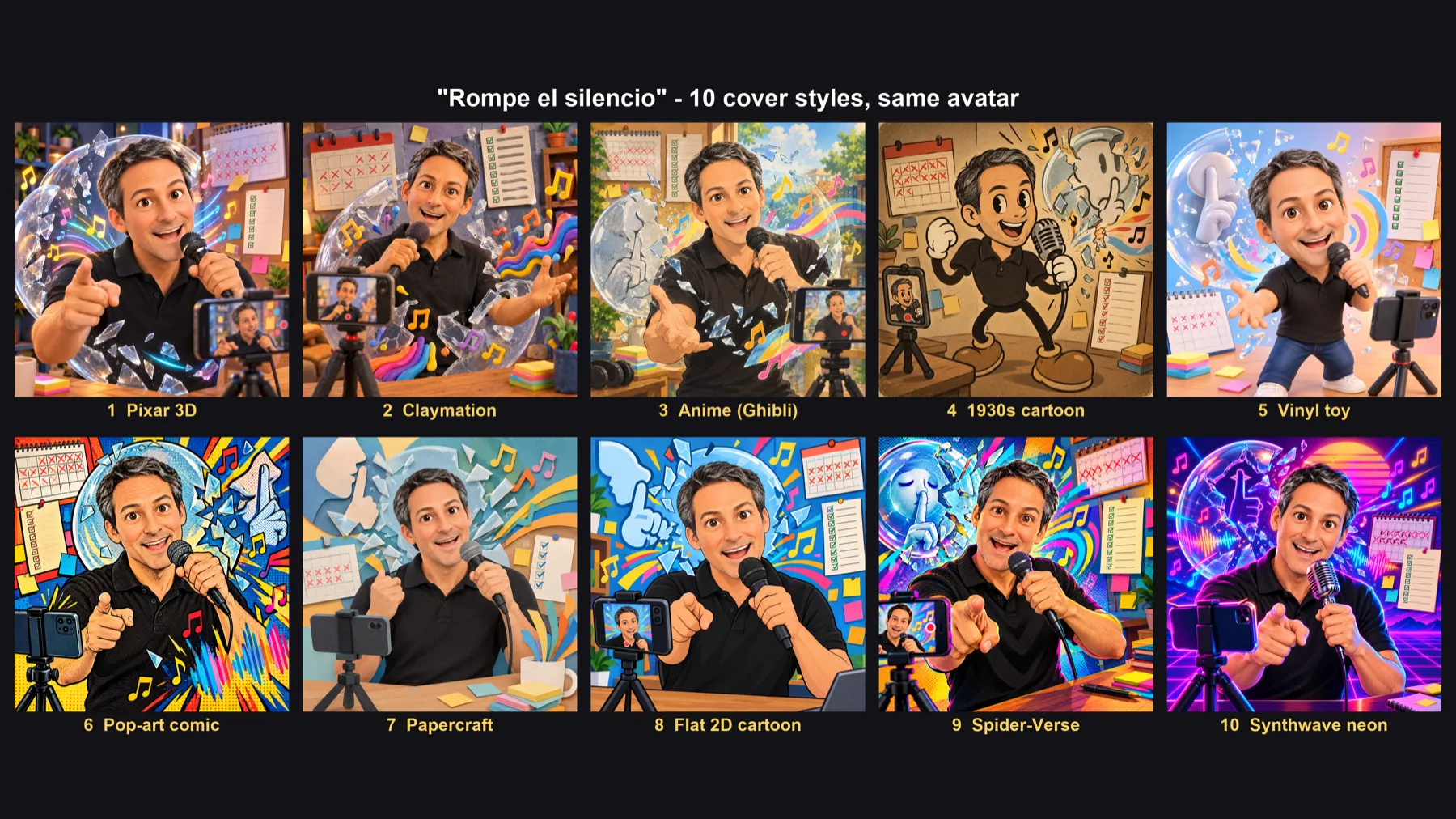
Your face on the cover. Ten styles. Same avatar.

Upload 1–5 photos once. Every song gets a cover with your face — Pixar 3D, claymation, anime, synthwave… or let Suno paint it. Pick a video background matched to the style and render a 9:16 or 16:9 karaoke video.

AI cover artKaraoke timingsOne-click videoVinyl cover art
The sound

Mood, style, language — before you hit play

The same Advanced card you use to steer the song.

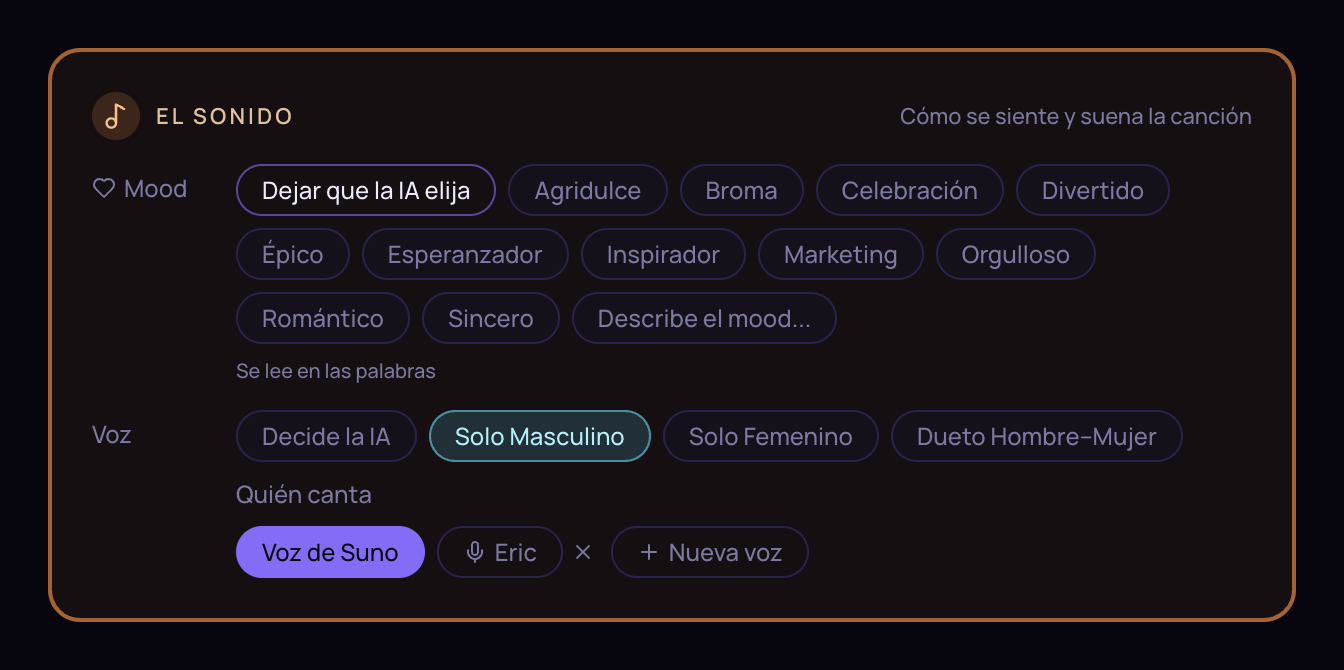
The Sound block: mood and song options
Your voice

Upload one recording. Sing in any style.

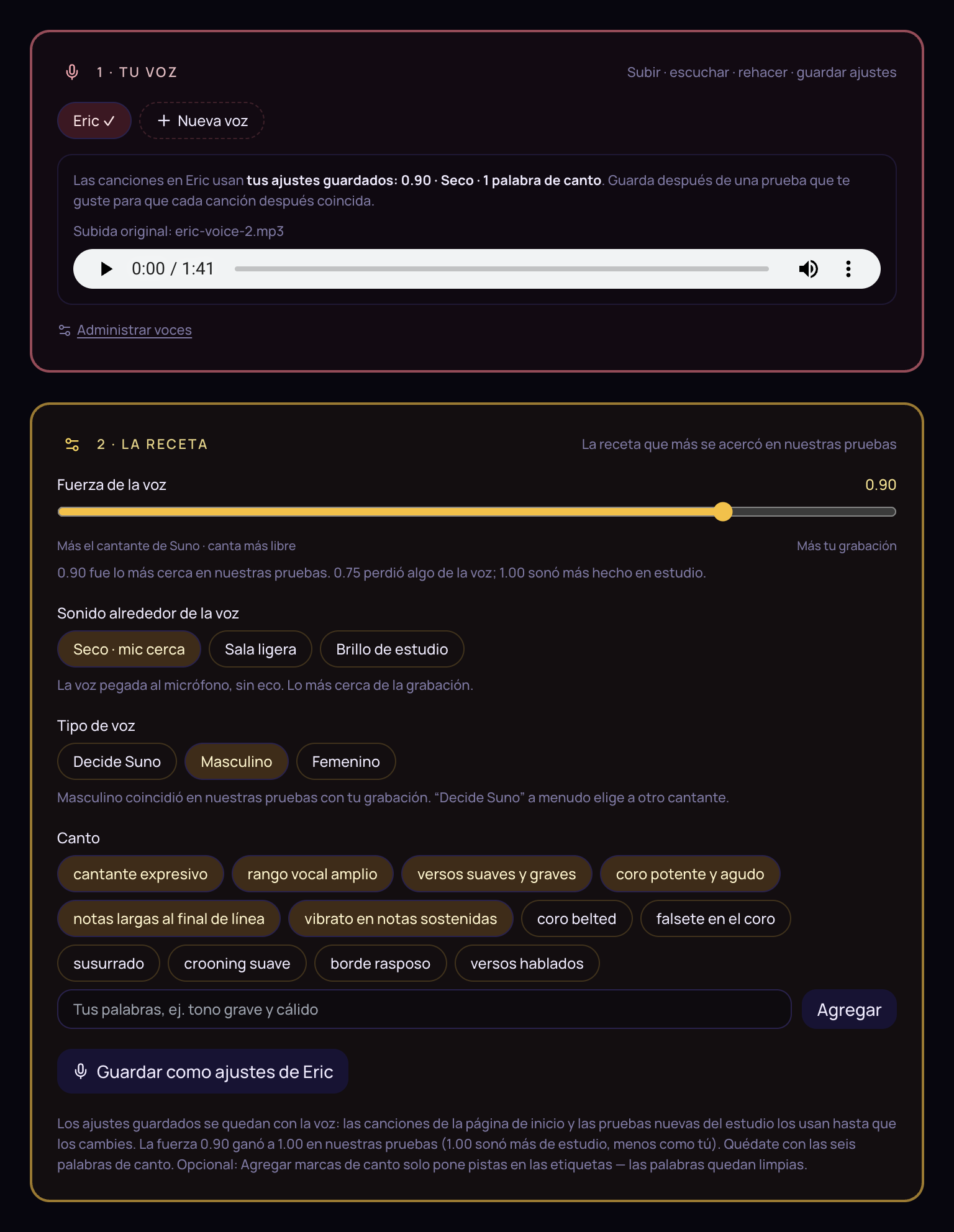
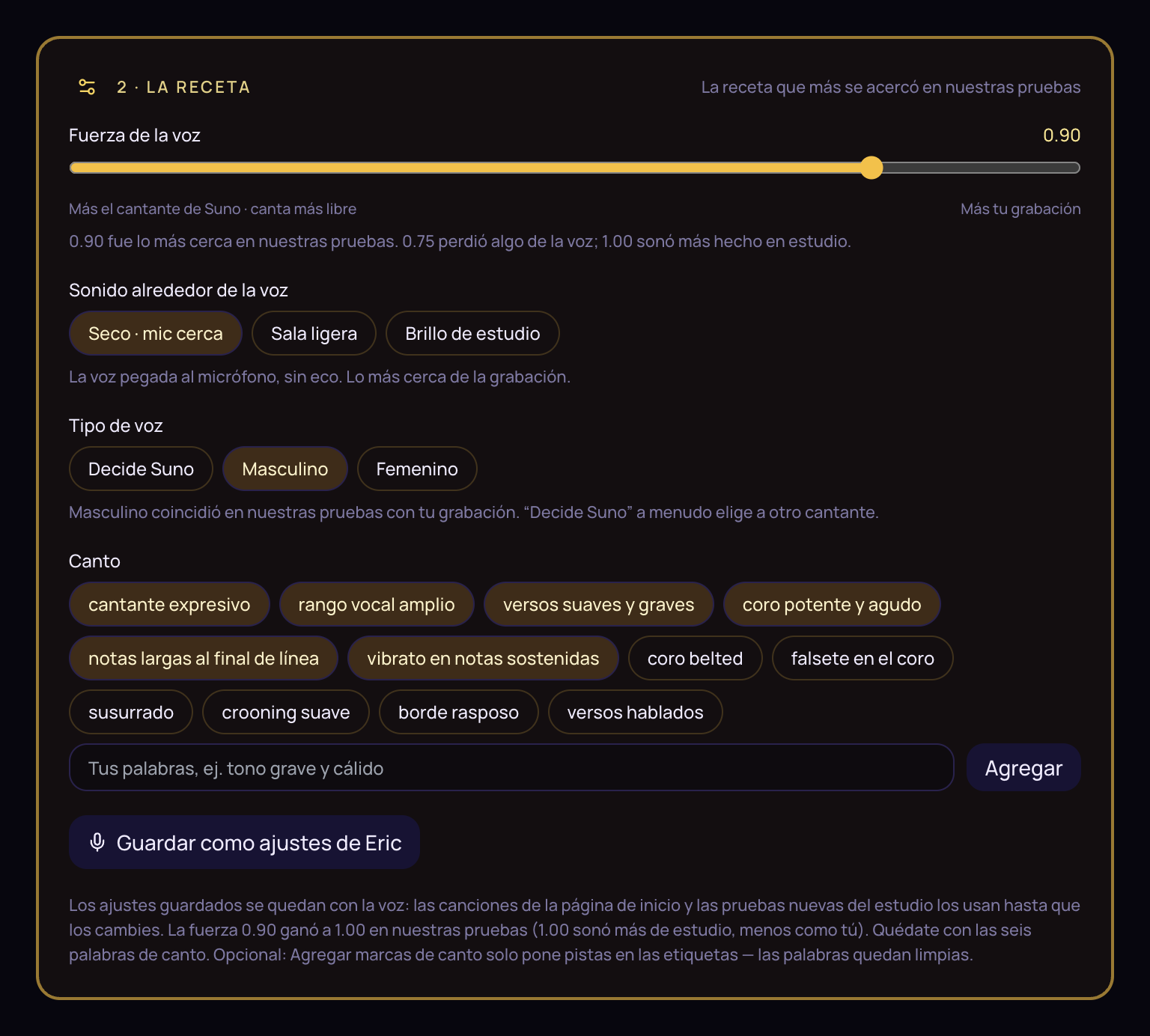
Voice Studio keeps the voice and the recipe — strength, mic, singing tags.

Voice Studio: Your voice and the recipe
From one song to an album

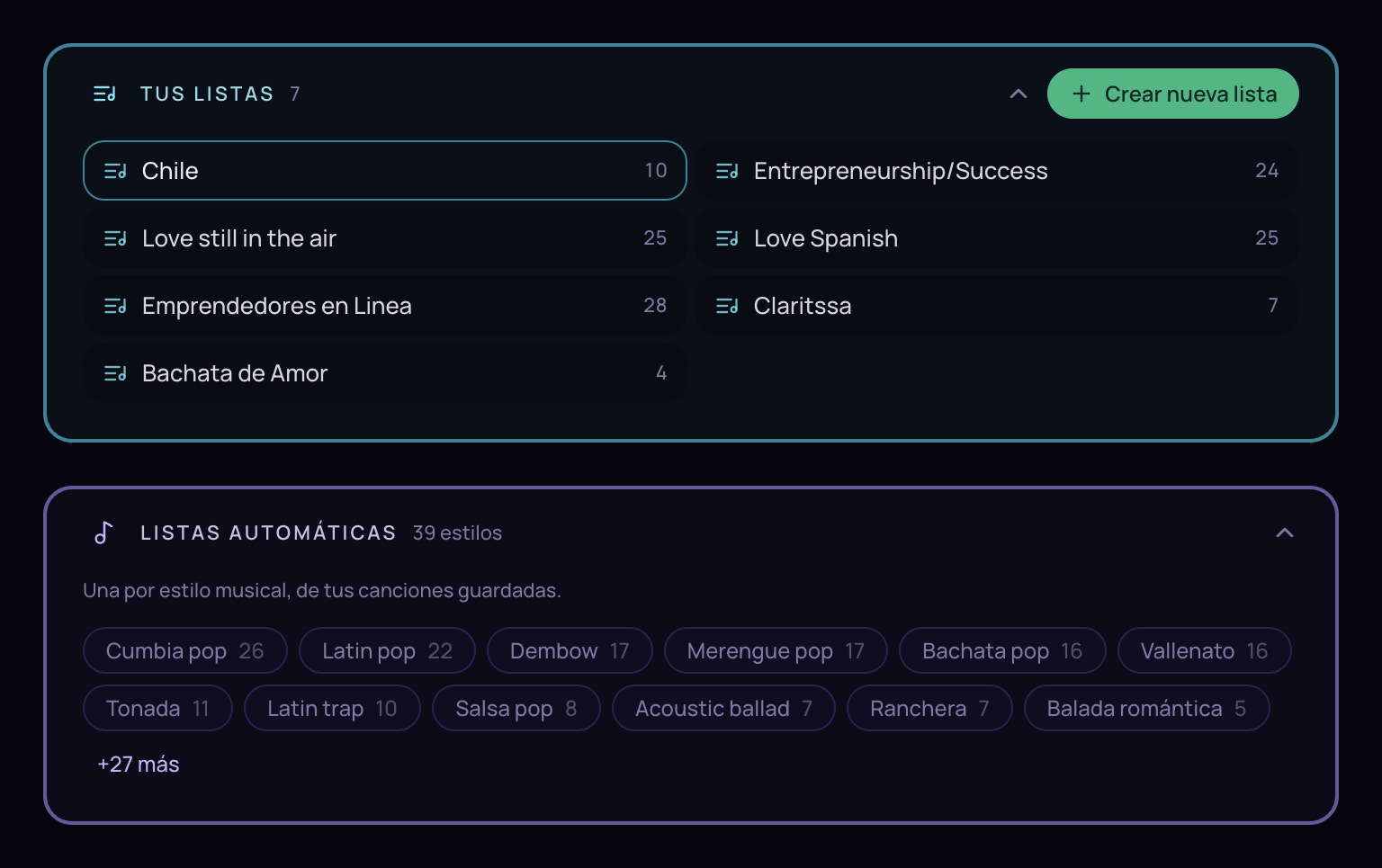
Your lists + one per style

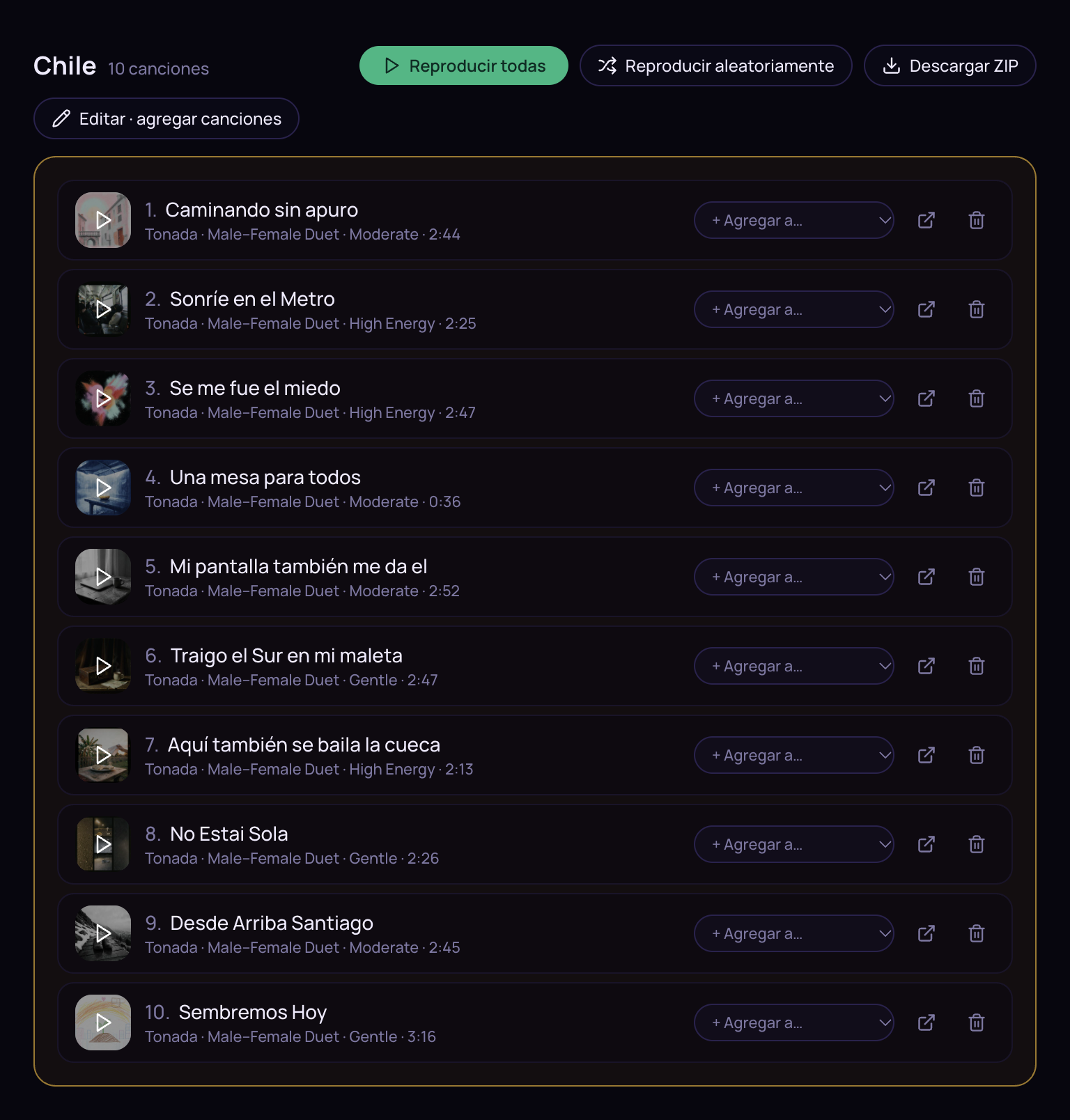
Organize, play all, download ZIP — and let it grow by genre on its own.

Playlists: Your lists and automatic lists
Features · the full list

Everything it does. Exactly.

No marketing fog — this is the complete list of what you get, button by button. The music and covers come from Suno V6, Whisper listens to your voice, and an AI writer — Claude, GPT or Gemini, your pick — writes and judges the lyrics. All of it runs on your own keys, with nothing hidden.

Music: Suno V6 Listens: Whisper Writes & judges: Claude · GPT · Gemini Karaoke video · YouTube clips
01

App shell & navigation

Always one click from your library, your voices, your settings.

Header

  • Brand / home — back to start, library untouched.
  • Playlists and Voice Studio workspaces.
  • Reset — clears this session's drafts; keys, songs, wishes, lessons and faces stay.
  • History Vault — side sheet: open, play, download MP3, delete (goes to a Trash folder, not into the void).
  • Settings drawer.

Global UI

  • Activity toaster — song, cover, judge, rewrite, video, queue and Voice Studio tries: working → done → error.
  • Missing-keys banner — nudges you to Settings.
  • Library loads first — your songs are there before the screen is.

Quick vs Advanced

  • Quick — mood + popular style + orchestra + one input. Song made at once; AI picks vocals, Suno writes words and paints the cover.
  • Advanced — voice, language, Sound details, who writes, names, wishes, lessons, cover face.
  • Choice remembered per browser.
02

Making one song

The main page. The studio most Suno users never get.

TranscribeWhisper via OpenAI or Groq
Write lyricsClaude, GPT or Gemini — three versions in one round
Suggest soundrhythm, energy, instruments from the words
GenerateSuno V6 on Kie or API Mart
Waituntil both takes are ready
Coverparallel image job, your face if chosen
Timingsword / line timings for karaoke & video

Song DNA

  • Import JSON — restores every choice and locks them so “suggest sound” can't overwrite.
  • DNA panel on a finished song — download Markdown / JSON, copy text. Re-import on the start page.

Mood & who sings

  • Preset moods, custom text, or “Let the AI choose.”
  • Vocals — AI decides / Male / Female / Male–Female duet.
  • Saved singer — Suno's voice or a real person's clone from Voice Studio (API Mart).

Style & language

  • Catalog of styles with Auto; Quick shows popular, Advanced shows all with “mostly used” hints.
  • Explicit language, custom language, or follow the style then Settings default.

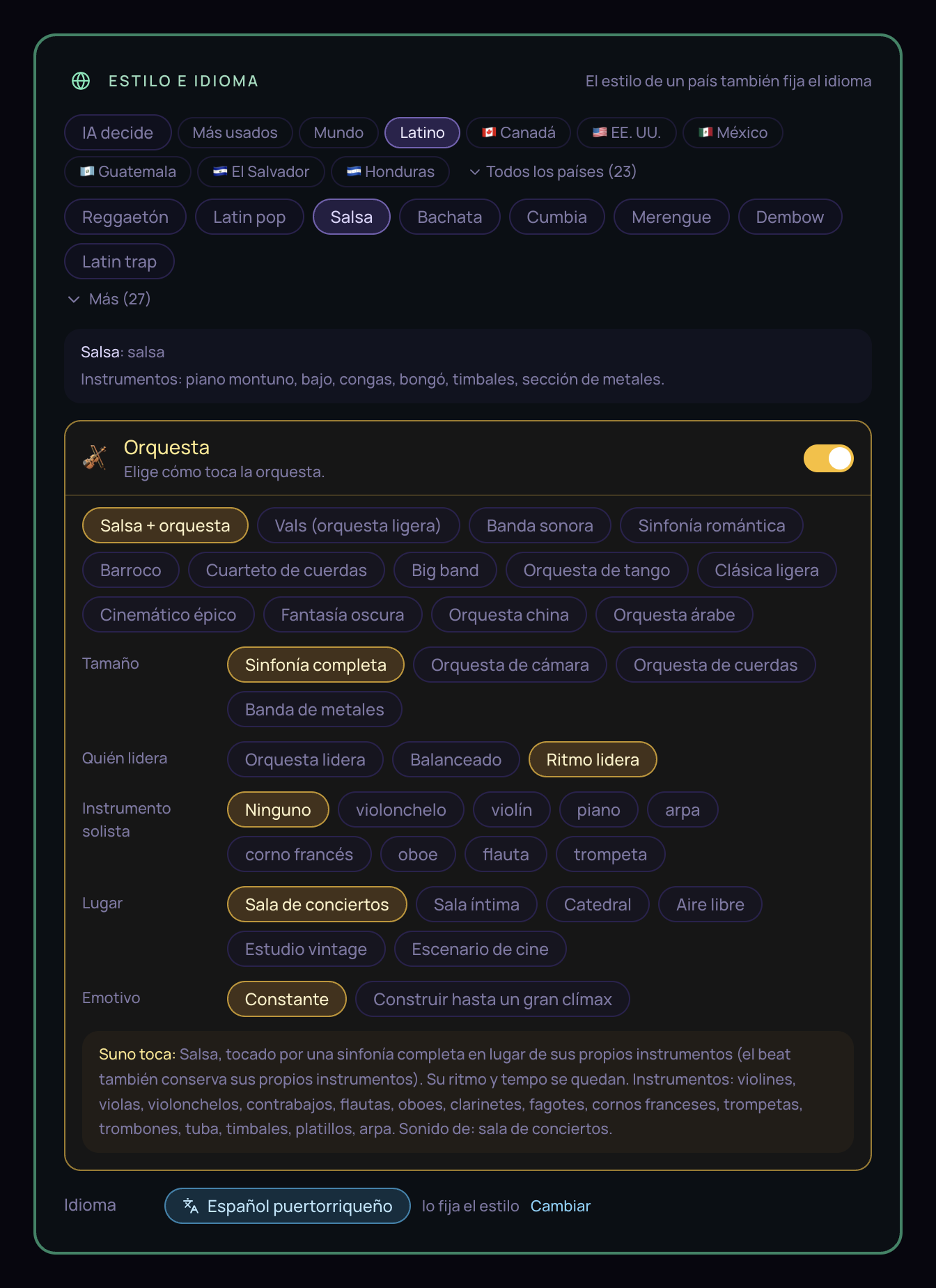
The Orchestra switch

  • Your style + orchestra — keep the genre, have a live orchestra play it; who leads: orchestra / balanced / beat.
  • Orchestra styles — waltz, film score, romantic symphony, baroque, string quartet, big band, tango, light classical…
  • Shape — size (full symphony, chamber, strings, brass), solo instrument, place (hall, room, cathedral, open air), and whether it builds to a big finish.
  • “Suno plays” line — plain-language preview of the exact orchestra words sent in the prompt.

Sound details Advanced

  • Length, Energy, Rhythmic influence, BPM with nudges.
  • Groove chips, Instruments & extras (hooks, sing-along…).
  • Orchestra instrument kit editable with full symphony.
  • Back to style preset clears every override.

The words

  • Who writes — Suno (description in, song out) or Our AI (three lyric versions, then Suno sings).
  • Names — first names the song addresses; Name role: speak to them vs praise the expert.
  • Wishes — saved lyric rules, toggled on, injected first; improve with AI.
  • Lessons — rules learned from accepted judge fixes, with score history.

Cover face

  • Eric's avatar, upload 1–5 photos of another face, or none (Suno's thumbnail).
  • Saved faces reusable on this device or account.

Input modes

  • Record with level meter → Whisper.
  • Chat — paste a conversation, preview speakers.
  • Text — any prose or page as source material.
  • Lyrics — sung as written, tags supported.
  • Drafts persist; paste and drag-and-drop.

Review screen

  • Lyrics-focused vs full sound — new songs emphasize lyrics; “edit a copy” brings the sound card back.
  • Pending rewrite — change mood / language / names and one Rewrite fires, not many.
  • Location presets or custom place. Suno description collapsed, full prompt visible.
  • Source — transcript read-only (download recording); chat / text editable; Save + write three new versions.
  • Title & lyrics editors, Versions kept, three angles per round.
  • Judge ranks the three and proposes line fixes — Accept applies and learns a lesson.
  • Regenerate / Rewrite, Make the song / Cancel, Back to the song.

Errors & recovery

  • Clear phases: listening, writing lyrics, sending to Suno, waiting.
  • Check again · no new charge — resume a task already started.
  • Back to review / Try again without losing the brief.

Finished song — the player stage

  • Takes A / B — two Suno versions; switching swaps audio, timings and media.
  • Player — play / pause, seekable waveform, download MP3, spinning vinyl cover.
  • Stage modes — Auto (floats when you scroll past), Float, Page. Floating remote drives the same audio element.
  • Karaoke / All words — three-line window or full scroll; Sync nudge ±0.25 s.
  • Cover panel — versions, Suno thumbnail, regenerate or modify with a note, change face, download.
  • Track badges, Edit again, Record another.

What Quick hides

No names, wishes, face picker, writer choice or Sound details on the start screen. Three clicks and one input; the AI does the rest.

Style · language · orchestra

The studio Suno doesn’t give you

Country style, language, and the orchestra switch on one screen.

Style and language with orchestra
03

Settings

Your keys, your defaults, your engines. Nothing hidden.

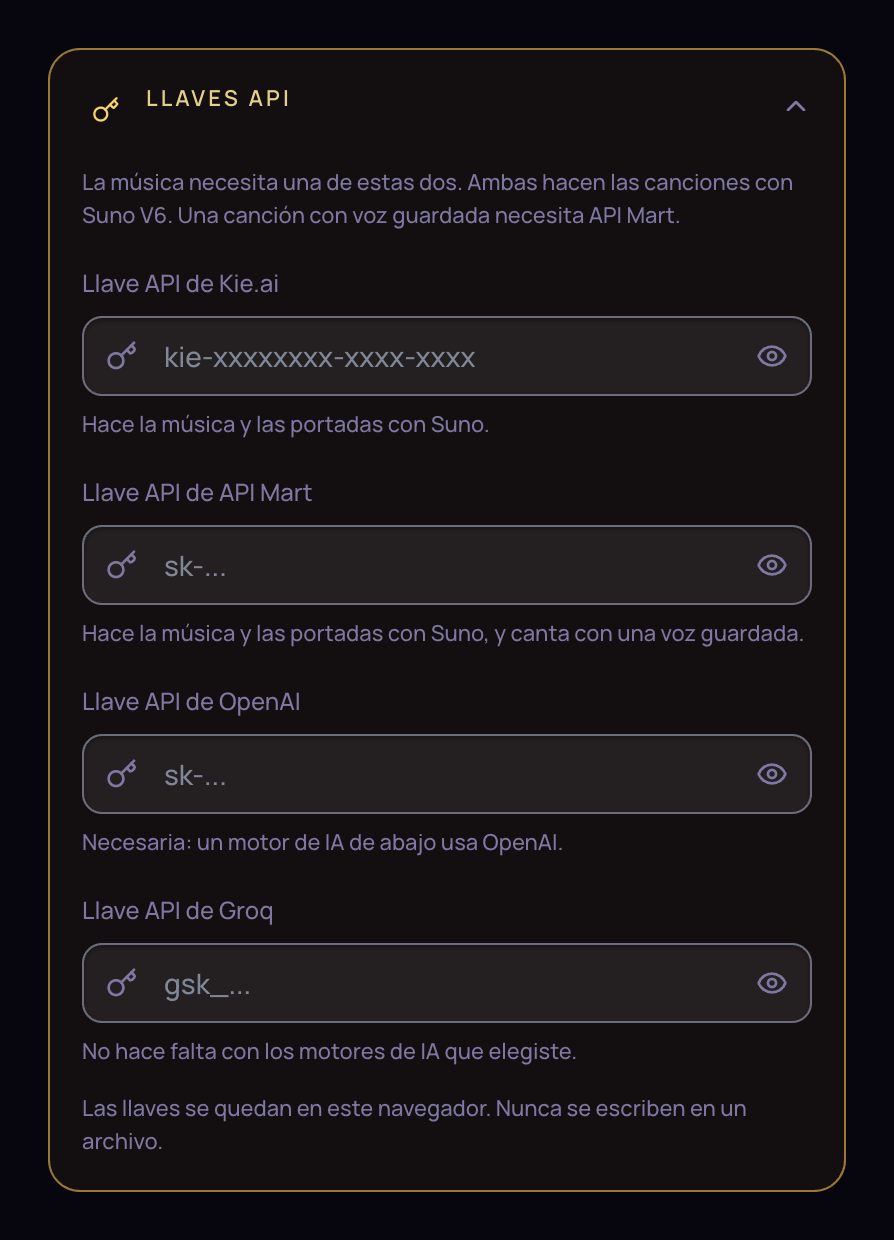
API keys

  • Kie.ai — music & covers via Suno models.
  • API Mart — music & covers (V6); required for saved voices.
  • Provider choice when both are set.
  • OpenAI / Groq as the engines need them.

Song defaults

  • Mood, style, language, length, place.
  • Who writes (Suno / Our AI), who sings, rhythm, energy, name role.
  • Orchestra on/off and default shape.

AI engines

  • Music model (Kie) — V6 / V6 Mini / V6 Wild. API Mart is V6.
  • Listening — OpenAI vs Groq Whisper.
  • Writing — Claude, GPT, Gemini or Groq. Switch any time; the app does not care which one.

Reset: let the AI decide

Mood / style / language / length → Auto; everything else → product defaults. Keys, engines and library untouched.

Playback

Auto-play the new song the moment it is ready.

Library tools

  • Counts; disk vs browser mode.
  • Export everything — one JSON (tracks, playlists, wishes, lessons).
  • Import merge-adds, never deletes.
  • Copy browser → disk.
Your keys

They stay in this browser

Kie, API Mart, OpenAI, Groq — never written to a server file.

Settings: API keys
04

Playlists

From one song to a whole catalog — planned by AI, made in the background.

Listen / library

  • Create, search, fold, select playlists.
  • Automatic playlists — one per style you've used.
  • Play all / Shuffle, Download ZIP (style - title.mp3).
  • Song actions, bulk select, delete forever (to trash on disk).

Playlist stage

  • Cover, player, lyrics, auto-advance, prev / next, order vs shuffle.
  • Same Auto / Float / Page stage modes.
  • Document Picture-in-Picture window; mini bar when floating.
  • Compact stage while editing so music keeps playing.

Create · plan · make

  • Mood & vocals (incl. Mix), styles multi-select, one language or several.
  • Topic & About — text, file, Improve with AI + Undo; numbered lines become branches.
  • Plan / Plan more / Plan again — distinct ideas; keeps songs already made.
  • Check songs + Make — background queue, a few at a time, saves tracks & covers.
  • Stop / resume, per-song status, retry failed, cost hints.
Inside a list

Play all · shuffle · ZIP

The open playlist with every song, cover, and action.

Playlist detail with songs
05

Voice Studio

Clone a real voice and tune how it sings. Needs an API Mart key.

Voices

  • List, rename, remove saved clones.
  • Upload a recording; optional light prep; create or remake a Suno persona.
  • Listen back to the stored source file.

Recipe — how the clone sings

  • Strength — how closely Suno follows the recording.
  • Sound — dry close-mic / light room / studio polish.
  • Gender — Male / Female / Suno decides.
  • Singing tags — chips + custom words; default six-tag recipe from ear tests.
  • Save for this voice / Back to winning recipe.

Test song

  • Music presets or own music text.
  • Fixed sample lyrics or New words.
  • Section marks like [Verse - soft, low].
  • Length (e.g. 30 s). Sing a try → two takes; history with play & delete.
The recipe

How your clone sings

Strength, room sound, voice type, and singing chips — the recipe that came closest in our tests.

Voice Studio: the recipe
06

Video & YouTube

A karaoke video for every finished song. Vertical for Reels, wide for YouTube.

Picture karaoke video

  • Backgrounds — style-suggested and theme pictures; saved on the track.
  • 9:16 (TikTok / Reels / Shorts) and 16:9 (YouTube).
  • Make / Make again — renders the video for you: karaoke overlay, title, level bars, spinning vinyl cover.
  • Preview & download the MP4; follows your karaoke timing and sync nudge. Up to ~2 minutes when hosted online, longer on your own computer.

My YouTube video local

  • Paste a URL, confirm rights, load metadata.
  • Pick a start window equal to the song length; horizontal crop focus; lyrics center / top.
  • Silent embed while picking; live karaoke preview over the clip.
  • Make — grabs only that window of your video and lays the karaoke over it, clean, without titles or logos.
07

Library & persistence

Yours, on your disk, surviving the provider's short-lived links.

What is saved

  • Tracks — brief, lyrics, takes, covers, timings, videos, DNA.
  • Playlists, wishes, lessons, non-secret settings.
  • Local copies of every MP3 and cover, so they outlive the provider's short-lived links.
  • Voice Studio uploads and try history.

Storage modes

  • On your computer — everything saved to a folder on your disk.
  • In the browser — when hosted online without a disk, the browser keeps your library.
  • Export / import — the whole library as one file, merged in anywhere.

Trash

Deleted songs move into a Trash folder on your disk. Nothing vanishes into the void.

08

Who does what

The AI services working for you on every song — and, honestly, what the app does not do.

JobWho does it
MusicKie.ai Suno API Mart Suno V6
Saved singing voiceAPI Mart only
CoversKie API Mart image models
Speech to textOpenAI Whisper Groq Whisper
Lyrics · judge · wishes · playlist plan · Voice Studio wordsClaude by default GPT, Gemini or Groq — one switch in Settings
Suggest soundOpenAI Groq
Karaoke timingssame provider as the music task
Video renderbuilt in — on your computer or the server
YouTube clipbuilt in — on your computer
Not in the product, on purpose: no login, accounts or billing UI — you paste your own keys. No separate trash page. Phones skip the floating player and Picture-in-Picture extras.
Benefits · what's in it for you

What you get if you grab your copy

Two ways to own it. Pick yours — the page adapts.

Own the whole studio. Run it on your machine, read every line, add what you want, remove what you don't — and never pay anyone a monthly fee again.

Source code · personal or commercial license

Edit anything

39 components and 25 API routes, yours to bend. Open it in Claude Code, Codex or Gemini and just talk — your AI, your rules.

Your keys, your bill

Pay the pennies each song costs on your own API keys. Nobody marks them up. Nobody counts.

Private by construction

Your recordings and chats never touch a Chorus777 server — there are none. Everything lands on your disk.

No meter, ever

No download cap, no seat limit, no plan tier. Every take is saved the second it exists.

Open it anywhere, like a new Spotify — except every song in the catalog is about your people, in your style, and you made it in three minutes.

Monthly plan · hosted · worldwide

Nothing to install

Open a link on any device: phone, tablet or computer. Record, paste, make. Your library follows you.

The studio on top of Suno

Everything Suno Premier doesn't do: playlists, your face on covers, karaoke video, voice recipe lab, wishes & lessons.

One flat price

Anchor: $29 / month, or $19 / month billed yearly. Less than a stock-music plan that never lets you own a song.

Still yours

MP3s, covers, videos — download anything, export the whole library as one JSON any day.

Talk, paste, or record anything — and in about three minutes you have a finished song, with a cover, karaoke lyrics and a video, in any style, any language, with an orchestra if you want, even in your own voice. Then do it 25 times in a row and hand out a whole album.

The one-sentence pitch
01

Your money stays in your pocket

Stop renting music

What one person pays per year for background music vs. what one evening of songs costs here on your own keys.

Epidemic Sound · Artlist$120–300 / yr
Suno Premier$360 / yr
Suno Pro$120 / yr
Chorus777 — an evening≈ $1

A 3-minute song is a few cents to about a dime. Covers and lyrics are fractions of a cent to a few cents.

No “pro” tiers you don't need

Generators charge $10–$30 a month and then meter your downloads (20 or 60). Here there is no download meter. Every take is saved to your disk the moment it exists.

No seats, no users, no middleman

It runs on your computer (or your own free Vercel). No account, nothing to log in to, nobody counting your songs. You plug in your own keys and see your own costs.One plan, one price. Your API costs pass through at cost — you see exactly what each song cost, nobody marks it up.

02

Anyone can do it — not just musicians

Zero musical skill

You don't write chords. You don't know what BPM means. You pick a mood, pick a style, and speak or paste. Quick mode is three clicks and one input.

Any input becomes a song

  • A voice memo recorded on the spot.
  • A WhatsApp conversation — it understands who is speaking.
  • A web page, email, sermon, blog post, newsletter, product page.
  • Your own lyrics, sung exactly as written.

It gets smarter with you

  • Wishes — write your rules once (“never say the name in the chorus”, “keep it in Colombian Spanish”) and switch them on forever.
  • Lessons — accepted judge fixes become rules that are reused.
  • Song DNA — one JSON holds a great song's every choice. Import it, make a sibling. Share it; a friend gets your exact sound.
03

The tweaks are nearly infinite

Most Suno users type one line and take what comes. You get a studio.

The sound

  • 50+ styles plus Auto — reggaetón, cumbia pop, film score, Québécois folk.
  • Energy, rhythm, BPM, groove, instruments, extras — chips, not jargon.
  • Male, female, duet, or AI decides.
  • Accent and dialect enforced: Colombian coast Spanish ≠ neutral Spanish.

The orchestra button

  • One switch turns any style into a live-orchestra version of itself.
  • Full symphony, chamber, strings, or brass band. Who leads. A solo cello, French horn, harp. A concert hall, a cathedral, open air. A big finish.
  • Reggaetón with a cello in a cathedral is one click away. You're listening to it right now.

The words

  • Suno writes, or our AI writes three versions at once (story / direct / image) and a judge ranks them.
  • Edit a line, swap a version, rewrite for a new mood — without redoing everything.
  • Address people by first name. Praise an expert. Speak to “you.”

Your own voice sings

  • Upload one recording in Voice Studio. From then on, you are the singer.
  • Tune how closely Suno follows you, how dry or polished the mic sounds, how it belts the chorus.
  • Save the recipe once; every song in your voice sounds like the same singer.
04

A finished product, not a demo

Every song arrives complete

  • Two takes (A/B) to choose from.
  • A cover — your face, a friend's face, or Suno's art.
  • Karaoke timings that light up on beat.
  • An MP3 you own, saved locally.

Video in one click

  • 9:16 for TikTok / Reels / Shorts, 16:9 for YouTube.
  • Backgrounds matched to the style, karaoke overlay, title, spinning vinyl.
  • Or lay the karaoke over a clip from your own YouTube video.

A player that respects you

  • Floats when you scroll, stays on the page, or lives in its own picture-in-picture window — your choice, remembered.
  • Takes, versions, cover history, Song DNA — one screen.
05

From one song to a whole catalog

  • Plan a full album from a topic. Type a topic, paste an “about” page, or drop a text file. The AI plans 5, 10, 25 distinct ideas — each with its own hook.
  • Press Make and walk away. A background queue sends songs a few at a time, survives a reload, retries failures. Come back to every MP3 in one ZIP.
  • Automatic playlists for free. Every style you've ever used becomes its own playlist with zero effort.

“25 songs planned in under a minute — all generated in the background while you do something else.”

Speed, measured
06

What people actually do with it

The “wow” list. Pick who you are.

A new worship song for Sunday

From this week's sermon notes — in the congregation's language and accent.

Cathedral orchestra hymns

Hymn-style arrangements with a real-sounding cathedral orchestra.

For a grieving family

A gentle song with their loved one's first name inside it.

Children's ministry

Songs that teach the lesson of the week.

Birthday · anniversary · graduation · wedding · retirement

A song for them, with their name, their story, in three minutes.

The family group-chat, as a comedy track

Paste it in. Everyone replays it.

A lullaby in Grandma's language

Sung in Dad's voice.

Karaoke night at home

With your own songs on the screen.

Music is one of the few things that reaches people who have stopped listening. Now you can write it for one person.

A song that says their name

Names the fear, and ends on the day they said yes — hopeful, specific, theirs.

A “you are not alone” playlist

Built from their own words.

A “deep work” playlist

25 instrumental-leaning tracks in your favorite style.

A party set

The exact genre and energy you want, no ads, no repeats.

Study music for a friend finishing exams

Gift it as a ZIP.

Jingles and theme songs

For your brand, podcast, YouTube channel, course.

Marketing mode

Writes with a problem → hope → action arc. Never salesy.

Vertical and horizontal karaoke videos

Reels / Shorts / TikTok ready; wide for YouTube.

Daily motivational songs, in bulk

For your community, from your newsletter. Teach a method in song.

Songwriters

Rapid demos of lyric ideas, in any style, with a judge's notes.

Singers

Hear your voice on a cumbia, a waltz, a film score — before you ever book a studio.

Teachers

Vocabulary songs in the target language with native accent.

A 20-song wedding playlist

For a couple.

A retirement album

From colleagues' messages.

A memorial playlist

From a family's memories. All downloadable, all yours to give away.

Rights — the honest version

  • No royalties, no licensing fees, no labels, no publishers.
  • Songs under a paid Suno plan carry perpetual commercial-use rights for permitted downloads.
  • Through API resellers (Kie.ai, API Mart) commercial use depends on the provider's terms — read them, keep your task IDs.
  • Fully AI-generated audio may not be copyrightable; lyrics you wrote are yours.
  • Play it, gift it, publish it, market with it — freely. Selling as a music product — read the terms first.

Privacy & control

  • Your recordings, chats and texts go only to the AI providers you chose, with your keys.
  • Everything saved to your disk. Export the library in one JSON. Import it anywhere.
  • Deleted songs go to a trash folder, not into the void.
  • Switch providers in Settings in ten seconds.

Speed

  • Quick mode: input → finished song in roughly 2–4 minutes, cover and lyrics included.
  • Playlist: 25 songs planned in under a minute.
  • Voice Studio try: ~30-second sample in about a minute for about five cents.
07

What the alternatives cost

And what they still don't give you. Public prices as of October 2026.

AlternativePriceWhat you still don't get
Suno Pro / Premier$10 / $30 per monthDownload meters (20 / 60); no playlist planner, no your-face covers, no auto video, no voice recipe lab, no wishes / lessons
Udio Standard / Pro$10 / $30 per monthDownloads disabled since late 2025
Soundraw Creator~$11–13 per monthInstrumental only
AIVA Pro~€33 per month (annual)Instrumental only
Epidemic Sound / Artlist~$120–300 per yearYou rent someone else's music
Chorus777your API costs onlyone flat plan + API at cost—
Commercial license
$12k–25k

Commercial license: publish this version or a modified one, charge for it, add plans and users, and build your own service. Requires paid commercial rights.

If you built it yourself
$15k–60k

300–600 developer hours at $50–100 / hour: five AI services wired together, video rendering, YouTube clips, voice cloning lab, playlist planner & queue.

What's in the box: the complete code (39 components, 25 API routes), every feature on the Features page, and your library stays on your disk. You bring your own API keys and your own coding assistant — Claude, Codex or Gemini all open the project and get to work. No account with us, nothing phones home.
Entry · Quick mode
$12–15 / month

Mood, style, one input, finished song. The low door.

Pro · Business
$49–79 / month

Bundled API credits, support, marketing playlist templates.

Compare: Suno Premier alone is $30 / month with a 60-download meter and none of the studio around it. The Studio plan costs the same, has no meter, and adds playlists, your face on covers, karaoke video, your own voice and a lyric judge — and every MP3 is yours to keep.
Use cases · what it is for

What will you sing first?

10 ways people use a song studio. Find yours, then make it in minutes.

Pranks01

A song about them, made while they watch

Collect a few details, press Make, then hit play. Their face is the best part.

  • The Uber prank. The driver notes the name, the pickup, the destination and the clothes, asks two questions, then plays the song.
  • A friend's birthday. Their name in the chorus, in the middle of the party.
  • Roommates. The house rules, as a funny peace treaty.
  • Game nights. Trivia clues, escape room riddles, and last week's adventure as a song.

Play it, then tell them. The joke is the surprise, not a secret.

Carlos, the Uber Guy · funk pop0:00
Family02

Words they waited years to hear

Their name, their story, the battles they won. Keep the tissues close.

  • "I love you, Dad." His life, his hard years and his wins, in one song.
  • A new child. A welcome song for the baby or the adopted child, and one for the new big brother or sister.
  • Grandparents. The stories behind the old photos, in their own words.
  • A time capsule album. Who you all are today, to play again in 10 years.
  • Even the dog. A song about its habits, for the pet sitter.
I Love You, Dad · acoustic ballad0:00
Love03

Say it better than you can say it

When the words get stuck, a song says them for you.

  • A love song for your partner. Your places, your jokes, your story.
  • The shy confession. Say it softly and let the chorus do the rest.
  • An apology with no excuses. What happened, and what you will do now.
  • The proposal or the first dance. A song nobody else has.
  • A friend far away. Your week as a song, from one time zone to another.
  • After a breakup. A song about the chapter you start now.
With You · R&B ballad0:00
Gifts04

The gift with their name in the chorus

Flowers fade. A song about them can play a thousand times.

  • Big days. Birthdays, quinceañeras, graduations, retirements.
  • Family holidays. Mother's Day, Father's Day, a Christmas album for everyone.
  • Get well soon. A warm song for the hospital room.
  • New beginnings. A new citizenship, a new job, a new home.
  • Many at once. 25 different songs for 25 people, in one batch.
Happy Birthday, Sofia · dance pop0:00
Motivation05

Words that lift you, in the music you love

What you need to hear, in the style that moves you.

  • Psychologists, coaches and mentors. A playlist of MP3s to give each client.
  • Your own power playlists. Positive words in reggaetón, rock, gospel or calm music.
  • "I am here with you." Songs for someone you love who is going through a hard time.
  • The gym, work and study. Focus music with your own goals in the lyrics.
  • Milestones. One year sober, the first marathon, the day you quit smoking. In your own words.

Music helps. It does not replace a professional.

Today I Can · pop rock anthem0:00
Calm06

Soft music for breathing, thinking and resting

No voice, no words to follow. Only a calm sound that stays out of your way.

  • Meditation and yoga. Long, gentle tracks for a class or a quiet morning.
  • Deep work. Music that helps you focus, with no lyric pulling you away.
  • Study sessions. A calm playlist for hours of studying.
  • Sleep and rest. Slow sounds to close the day.
  • Waiting rooms. Clinics, offices and studios with their own quiet music.
Meditation · no voice0:00
Study07

Learn it once, sing it forever

A chorus sticks in your head for a reason. Put the lesson in it.

  • Your exam notes. Paste them in and get a song with the dates, the formulas and the names.
  • Teachers. The lesson of the week as a song, the class yearbook song, the field trip recap.
  • Small kids. The first day of school, cleanup time, brushing teeth.
  • Languages. The phrases you need for your trip, sung slowly, with karaoke lyrics.
The Photosynthesis Song · school pop0:00
Faith08

This Sunday's sermon, as a song

With the words your faith uses, in the language and accent of your church.

  • Worship for Sunday. From this week's sermon notes, verse by verse or topic by topic.
  • Any style. Gospel, hymns, a cathedral choir, praise with a full band.
  • Children's ministry. Songs that teach the lesson of the week.
  • Prayer songs. For someone who is sick, or a family in grief.
  • The pilgrimage diary. The places, the people and what you felt.
You Are With Me · gospel choir0:00
Business09

Your own music, made for your customers

Music nobody else has, for your place, your videos and your clients.

  • Spas. Very quiet songs to play softly in every room.
  • Gyms and fitness classes. The trainer's playlist, tempo by tempo.
  • Salons. A song for every before-and-after video.
  • Real estate. A song about the house, for the tour video.
  • Shops and restaurants. A jingle with your name and your best dish.
  • Your team and your clients. A thank-you song for a client, a welcome song for a new employee.
  • Podcasts and live streams. An intro, an episode encore, a song for your community's milestone.
Spa · soft, no voice0:00
Community10

One song everybody sings together

A team, a street, a school: give them a chorus that is theirs.

  • The team anthem. The team name, the colors, the mascot.
  • Neighborhood volunteer day. A song about the park you clean together.
  • The shelter dog. An adoption song with its name and its funny habits.
  • The museum object. The old kettle sings its own story.
  • The school election. A campaign song with the real proposals.
Go, Tigers · team anthem0:00
Pricing

Choose how you want Chorus777

Three clear doors. Start with the one that fits you today.

Coming soon

Monthly usage

Worldwide · hosted

Soonworldwide access

Open Chorus777 on any device: phone, tablet or computer. Record, paste, make. Your library follows you, with no code to install.

Source code · commercial use

Publish · charge · plans & users

$997 USD · one payment

Right to edit, publish this version or a modified one, add plans and users, and charge monthly fees. Requires a commercial license.

Buy $997

Source Code License Terms

1. Personal Use License

2. Commercial Use License

3. Generated songs and media

4. General